Ready-made flow · A 3-6 panel strip with captions and speech bubbles
AI Comic Strip Generator
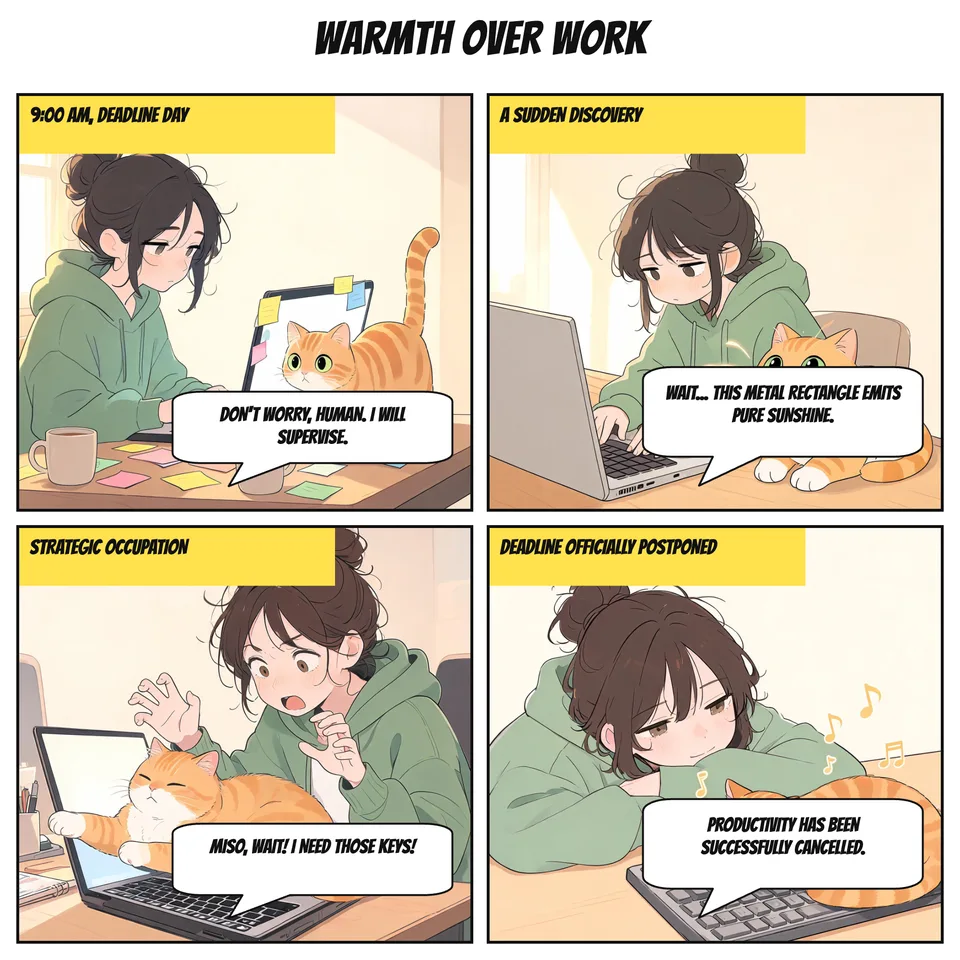
Idyllic's AI comic strip generator turns one line of story into a finished strip: three to six panels on one page, the same characters in every panel, a caption box and a speech bubble on each, and a title on top. The AI writer sets up the joke and lands it in the last panel, and every word stays editable.
- Size
- 2000×2000 px, one square page
- You get
- 1 strip of 4 panels (3 to 6) + each panel on its own
- Image model
- Seedream 5
- Cost
- 36 credits for a 4-panel strip, on Plus
- Styles
- Webcomic, Newspaper strip, Manga, Superhero, Cute, Noir
Real output · no retouching
One brief.
1 results.
- What happens?
- A cat tries to help its owner work from home, but the laptop is just too warm
- Characters (optional)
- Miso, a chubby orange cat; Dana, a tired designer in a green hoodie
- Style
- Webcomic
How to make it
Four steps, about a minute of your time. These are real screens from the run above.
- 01
Say what happens
Write what happens in a sentence or two, describe the characters if you have them in mind (Miso, a chubby orange cat; Dana, a tired designer in a green hoodie), pick a style and choose 3 to 6 panels.
Open the flow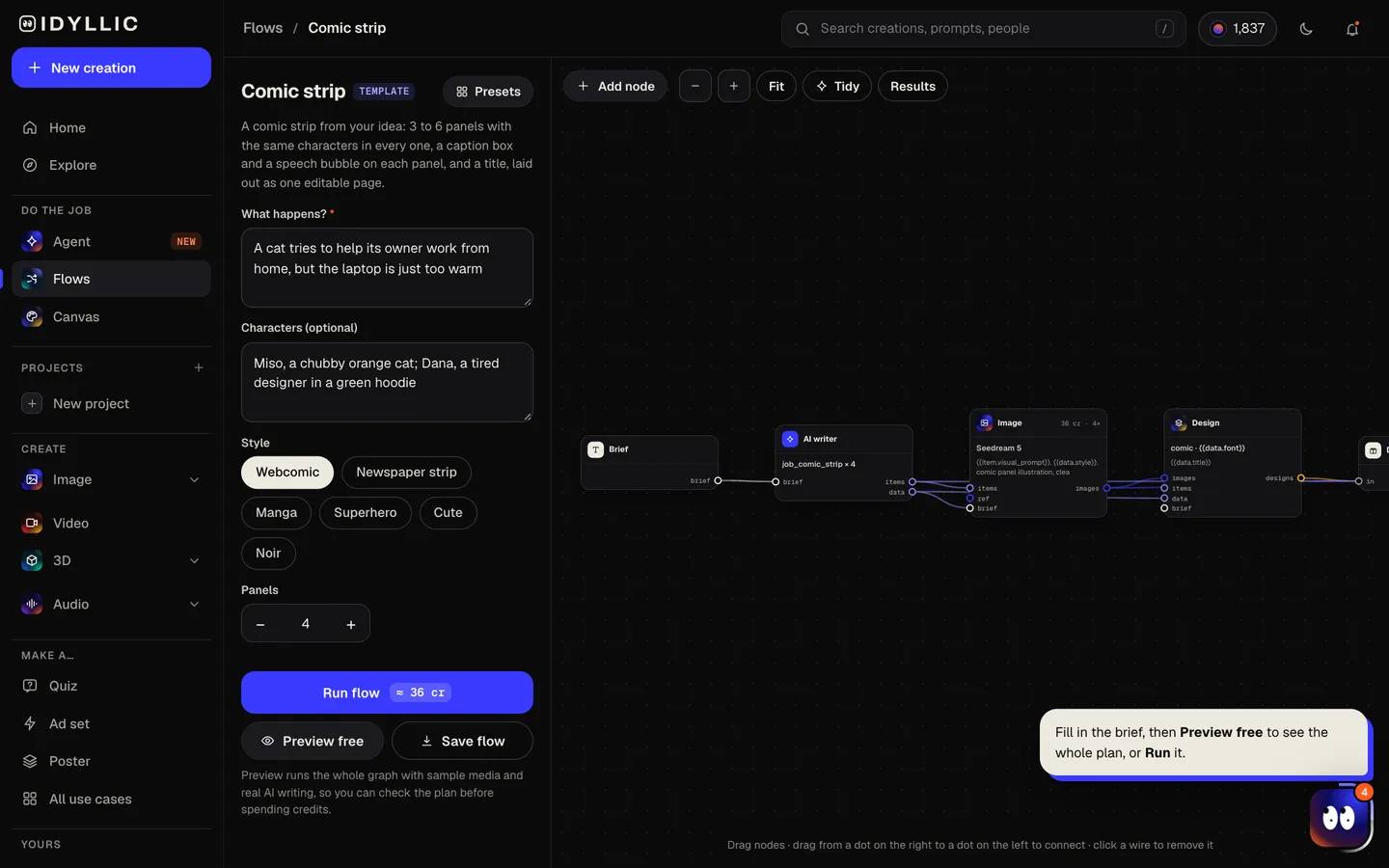
- 02
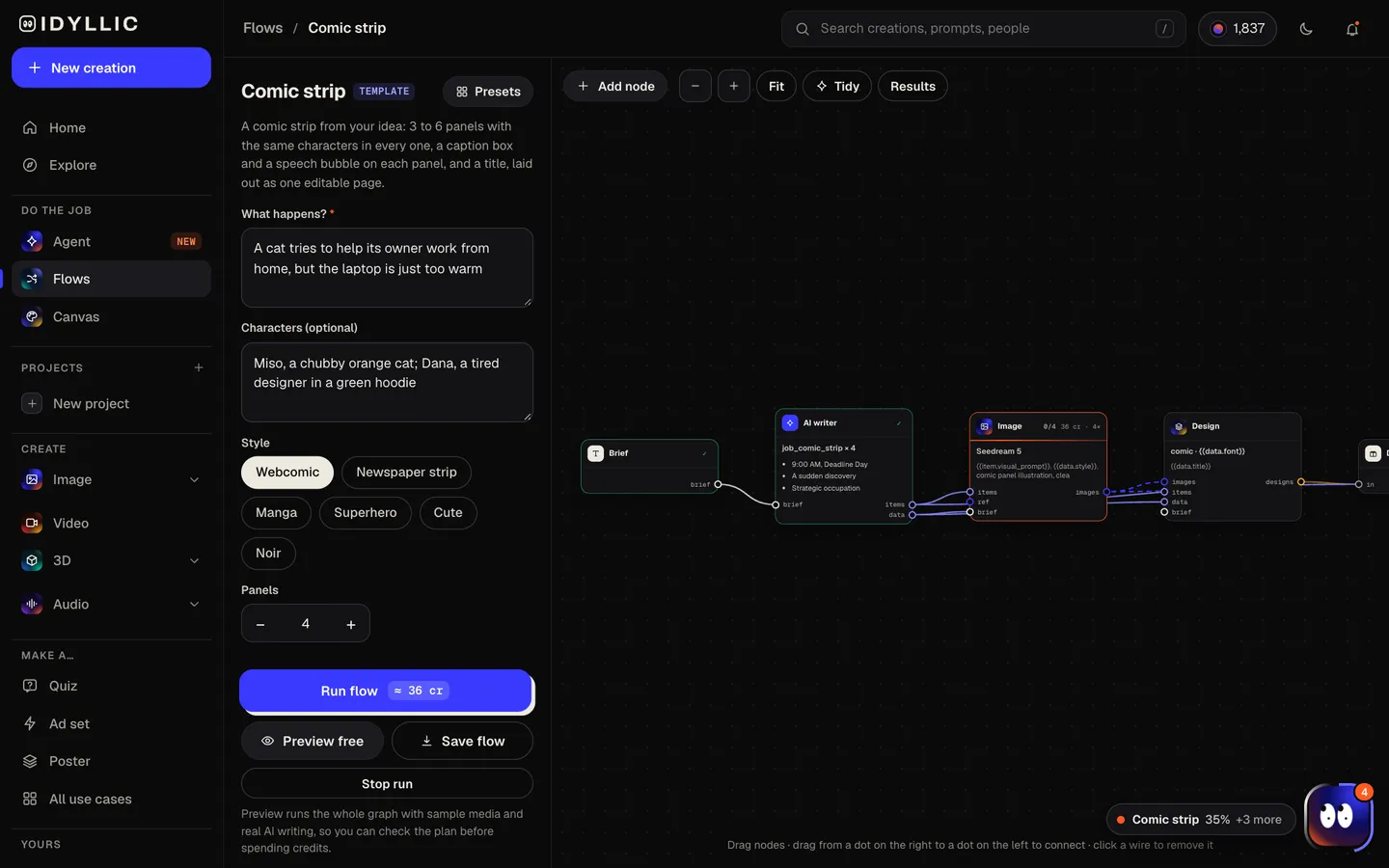
Watch it get written and drawn
The AI writer breaks the story into panels that set up, build and land the punchline, writes a caption and one speech line for each, and describes every character the same way in every panel. Seedream 5 draws the panels, then Idyllic lays them all out on one page. Preview the plan free.
- 03
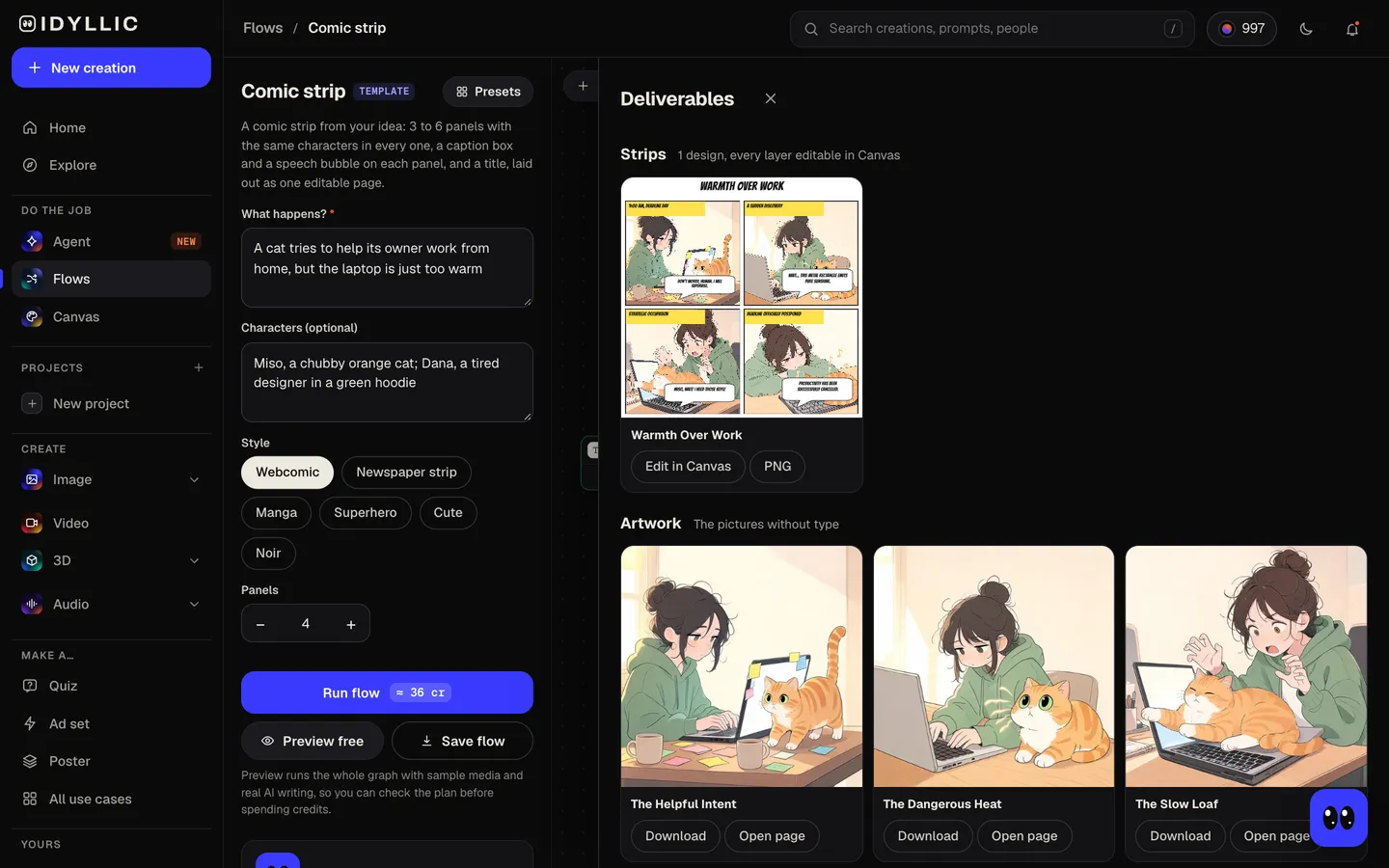
Read the strip
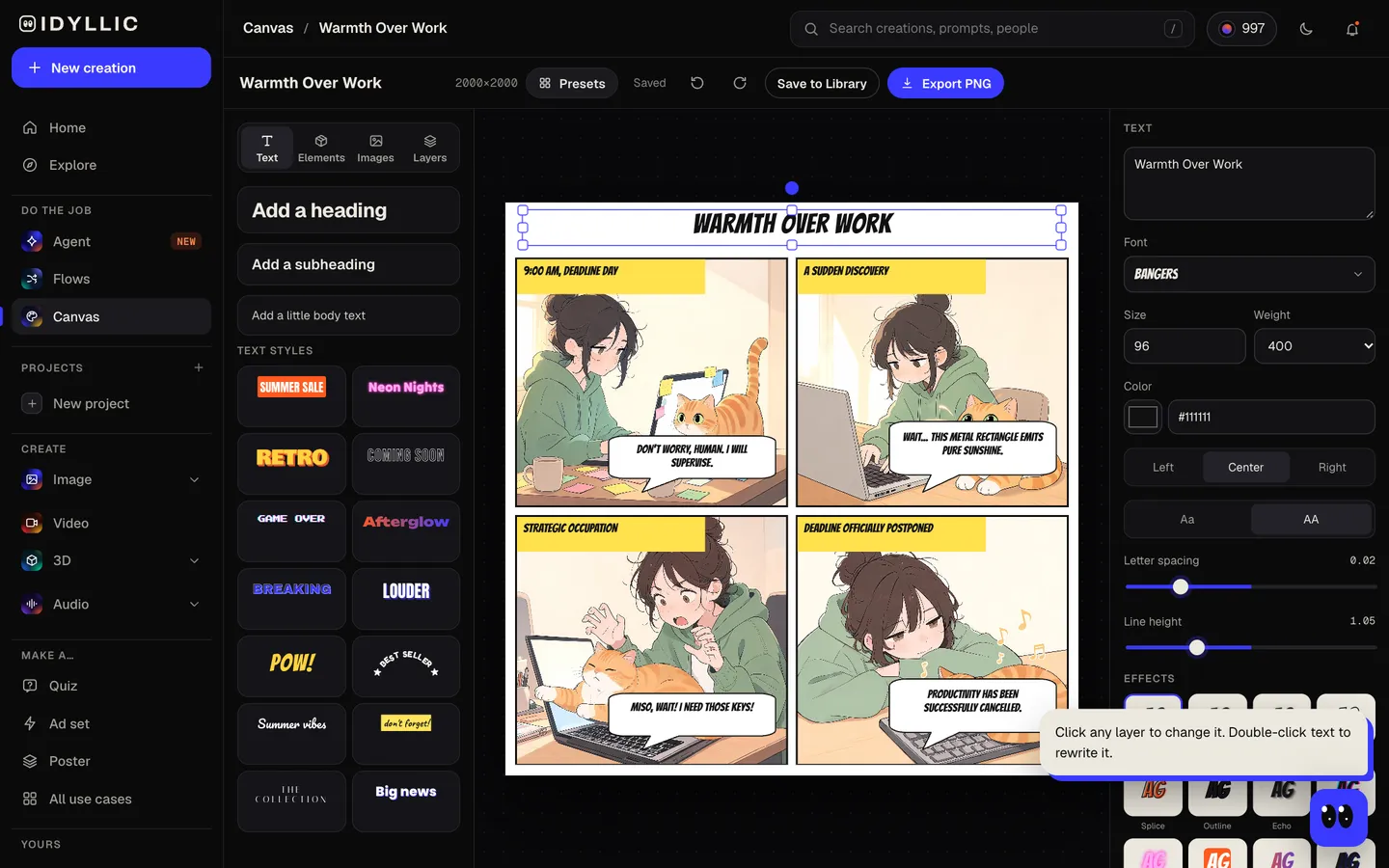
The finished strip appears as one page with its title, caption boxes and speech bubbles, next to every panel on its own without text.
- 04
Edit and download
Open the strip in Canvas to rewrite a line, move a bubble off a face, change the lettering font or fix part of a panel with an AI edit. Download a PNG at 2000×2000 px, or 4000×4000 px with the Large export.
Why it beats
a template
One page, not loose pictures
Every panel lands in one layout with borders, gutters and a title, so the strip is ready to post the moment it finishes.
Characters that stay themselves
The writer describes each character in exactly the same words for every panel, hair, clothes and colors included, so Miso is the same orange cat from the first panel to the last.
A joke with a shape
Each strip is planned as setup, build and punchline, with the twist saved for the final panel.
Real lettering
Captions and speech are set as real text in Bangers, a classic comic face, not painted into the art, so every word is spelled right and easy to change.
Three to six panels
Three panels sit in a row, four make a 2×2 grid, and six fill two rows of three, all on one square page.
Fix anything after
Rewrite a line after a test read, switch to any of 144 fonts, or select part of a panel and describe a change.
What makes a comic strip land
- One idea per strip. If the joke needs explaining, cut a panel.
- Save the punchline for the last panel and keep it to one short line.
- Keep speech under 12 words per bubble so it reads at phone size.
- Describe your characters once and reuse the same words for every new strip.
- Four panels is the classic rhythm: setup, build, turn, punchline.
- Post it square so it fits the feed without cropping.
Comic strip size and layout
| Idyllic strip | 2000×2000 px | Square PNG, one page with every panel |
|---|---|---|
| Large export | 4000×4000 px | Prints up to about 13×13 in at 300 ppi |
| Panel layout | 3 to 6 panels | 3 in a row, 4 in a 2×2 grid, 6 in two rows of three |
| Square social post | 1080×1080 px | Same shape; the strip scales down as it is |
| Each panel | Square picture | Saved on its own without text |
The page is square, so it posts as it is and prints well on square paper. Every panel is also saved on its own without text, handy for a carousel or a longer comic.
Steal a brief
Each one opens the flow with the brief filled in. Change anything before you run it.
A knight spends three panels preparing to fight a dragon that only wants to borrow a cup of sugar
Two houseplants argue over the sunny spot on the windowsill, newspaper strip style
A noir detective interrogates a toaster about a missing slice of bread
A superhero's toughest battle is assembling flat-pack furniture, in four panels
A manga-style student oversleeps on exam day, then realizes it is Saturday
Pixel the robot barista learns latte art while June, a patient regular, waits for her coffee
A dog guards the mailbox all day from a mail carrier who keeps bringing it treats
A tiny ghost tries to scare a family that keeps mistaking it for a lost sock, cute style
A penguin on a beach vacation keeps trying to cool off in the hotel ice machine, webcomic style
Questions
Is the AI comic strip generator free?
You can preview the whole flow free: real AI writing with sample images, so you can check the plan. Running it for real is on Plus ($10.50 a month, billed yearly) and uses 36 credits for a four-panel strip. The free plan also includes 3 free images a day in the image studio.
How many panels can a strip have?
Three to six, all on one page. Choose the number under Panels: three sit in a row, four make a 2×2 grid, and six fill two rows of three. Four is the default and the classic rhythm for a gag strip.
Will my characters look the same in every panel?
The writer describes each character in identical words for every panel and the whole strip is drawn in one style, which keeps them close. If one panel drifts, select that part in Canvas and describe the fix.
Can I write the dialogue myself?
Yes. Put the lines in your brief, or let the writer draft them and rewrite any caption or bubble in Canvas afterwards. The lettering is real text, so changes take seconds.
Can I make a comic with my own characters?
Yes. Describe them under Characters: name, species or age, hair, clothes and colors. The more specific, the more consistent. Keep them original, characters you invented rather than ones from existing comics or shows.
What size is the comic strip?
A square page of 2000×2000 px, or 4000×4000 px with the Large export. It fits a square social post as it is and prints up to about 13 in square at 300 ppi.
Can I make a series?
Yes. Run the flow again with the same character descriptions and style for each new episode, and post the strips in order.
Can I post or sell my comics?
Paid plans include a commercial license and private mode, so you can post strips, collect them into a book or use them for a brand.
Make something else
Everything you can make
Your turn.
Preview the whole flow free. No credit card.