AI Zoom Background Generator
Create custom virtual backgrounds for Zoom, Google Meet, Teams, webinars, classes, podcasts, and remote work. Prompt the room style, lighting, brand colors, season, aspect ratio, and whether the background should be professional, cozy, festive, or cinematic.
- Price
- Free to start · 3 images a day
- Output
- HD images, upscale to 8K
- Models
- FLUX, Imagen 4, GPT Image, Seedream
- Commercial use
- Included on paid plans
- Prompt language
- Any language
How it works
Three steps from idea to finished image.
- 1
Describe it
Type what you want in plain words, or start from one of the prompt ideas below. Magic Prompt can expand a few words into a detailed prompt.
- 2
Pick a style and format
Choose a model, style and aspect ratio. Idyllic generates several options in seconds.
- 3
Refine and download
Say what to change and only that changes. Upscale your favorite and download it in HD.
What you can create
- Professional office backdrops, branded meeting rooms, classrooms, studios, and cozy home offices
- Seasonal backgrounds for Halloween, holidays, launches, events, and team calls
- Clean 16:9 scenes with open center space for your face and readable composition
Prompting tips
Include the final use case, required format, audience, style, color palette, composition, text placement, and any constraints such as plain background, 16:9 video-call backdrop, printable card, or salon reference image.
Prompt ideas
Copy a prompt, or open it in Idyllic and make it yours.
Create a professional Zoom background with modern office shelves, soft daylight, plants, neutral colors, and subtle empty center space.
Generate a Halloween Zoom background with friendly pumpkins, warm lanterns, gothic window, no gore, and cozy spooky mood.
Make a branded webinar backdrop with navy wall, soft gradient lighting, abstract shapes, and space for a logo.
Frequently asked questions
Can I make multiple versions?
Yes. Generate a first concept, then refine the prompt with clearer style, format, lighting, color, text, and audience details.
Can I use the result directly?
Use the result as a creative image or concept. For regulated uses such as passport or official ID photos, check the final image against the official requirements before submitting it.
Is it free to use?
Yes. You can create 3 images a day for free with no credit card. Paid plans add more images, video, every model, private mode and a commercial license.
Do I need to be good at writing prompts?
No. Describe what you want the way you would say it. Magic Prompt turns a few words into a detailed prompt, and you can fix anything afterwards by describing the change.
Related tools
See all Interiors and spaces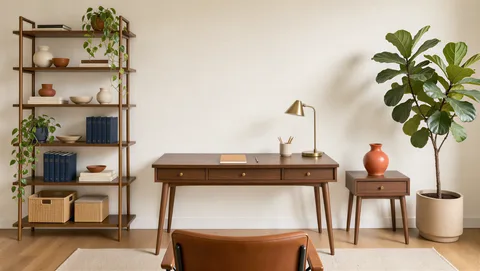
More in Interiors and spaces
Your turn.
Free to start. No credit card.