Ready-made flow · Cover photos for your page or profile, sized right
AI Facebook Cover Photo Maker
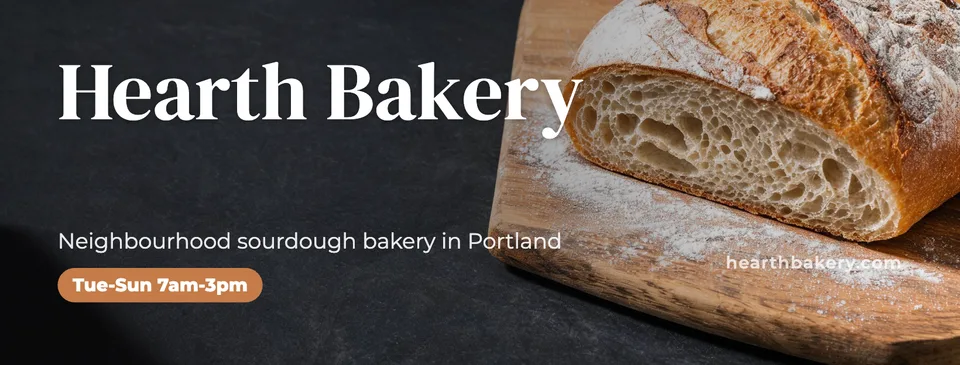
Idyllic's AI Facebook cover photo maker turns your page or profile name and a line about it into finished cover photos at 1640×624. Each is a different concept for a business page, a personal profile or a group, with the name, a short tagline and your hours, offer or link set in editable type, kept where phones and computers both show it.
- Size
- 1640×624 PNG
- You get
- 3 covers + the artwork without text
- For
- Business page, personal profile or group
- Image model
- Seedream 5
- Cost
- 27 credits for 3, on Plus and up
Real output · no retouching
One brief.
3 results.
- Page or your name
- Hearth Bakery
- What is it about?
- Neighbourhood sourdough bakery in Portland, open Tue-Sun 7am-3pm · hearthbakery.com
- For
- Business page
- Look
- Clean


How to make it
Four steps, about a minute of your time. These are real screens from the run above.
- 01
Tell it about the page
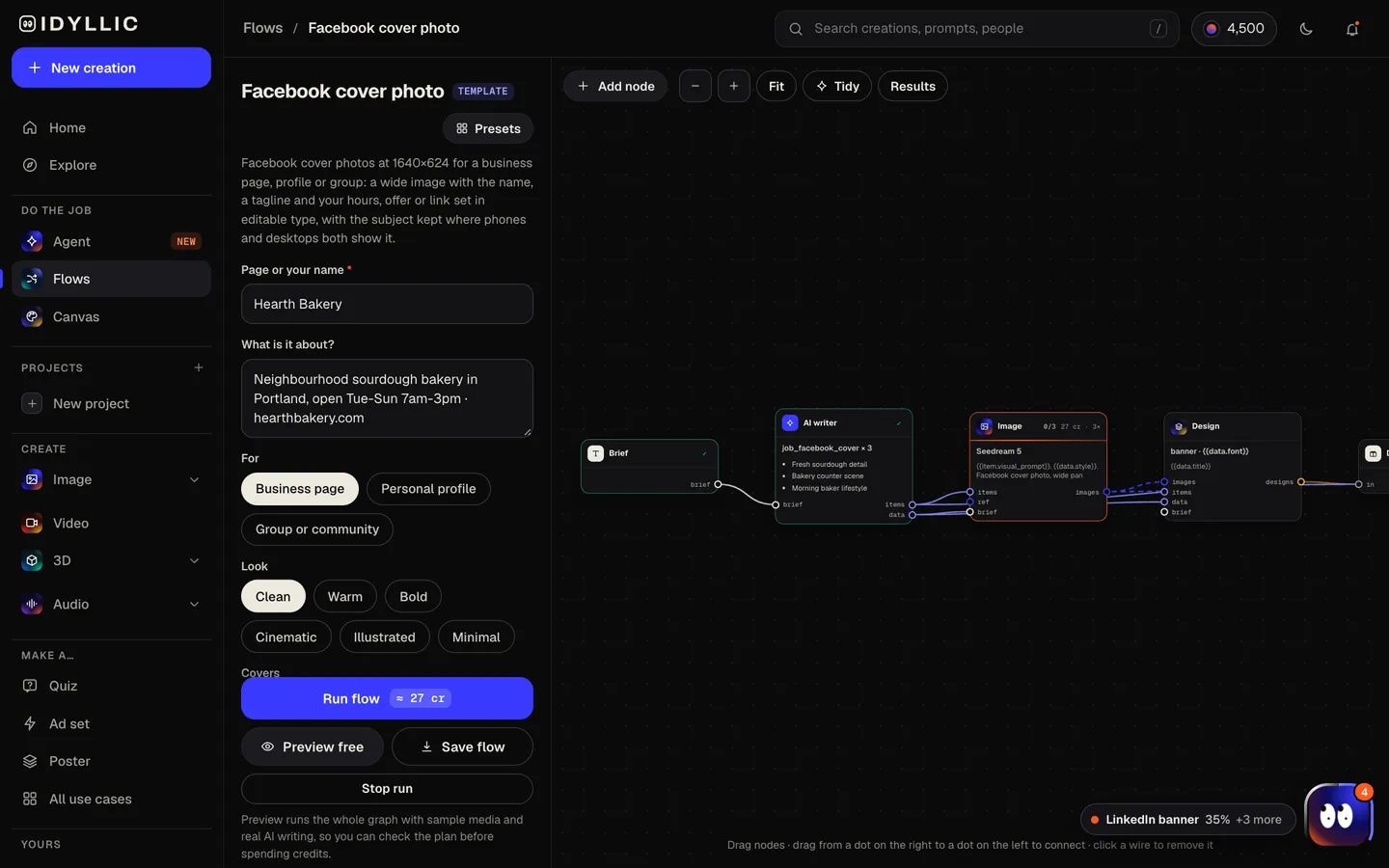
Enter the page name or your name, say what it is about (hours, an offer or your website can go on the same line), choose who it's for (business page, personal profile, or group or community), pick a look and choose how many covers to make.
Open the flow
- 02
Let the flow design it
The AI writer plans a different concept for each cover (the place, the product up close, a lifestyle scene, a pattern in your colours) and writes a tagline under eight words, plus a pill for your hours or offer if you gave them. Seedream 5 makes each wide image, then Idyllic sets the type. Preview the whole flow free first.
- 03
Compare the covers
Every cover appears side by side, next to the artwork without text, so you can pick the one that shows what the page is about at a glance.

- 04
Edit in Canvas and download
Open a cover in Canvas and change any word, font or colour, update your hours, or select part of the image and change it. Then download the 1640×624 PNG and upload it as your cover photo.

Why it beats
a template
Kept where every screen shows it
Facebook crops the cover differently on phones and computers, and your profile picture covers part of the left. The subject sits in the central band and the type stays clear of the bottom-left corner.
Built for your page type
A business page gets its hours, offer or website; a personal profile gets what you love or do; a group gets what the community is for.
Details you can update
Hours, offers and links are real type, so a holiday schedule or a new promotion is a quick edit in Canvas, not a new design.
Sharp on high-density screens
At 1640×624 the cover has twice the pixels of the long-standing 820×312 desktop size, so the type stays crisp on modern phones and laptops.
Different concepts, not small variations
Each cover is a separate idea, the place, the product or a lifestyle scene, so you are choosing a direction, not a filter.
Every layer editable
Try any of 144 fonts, add an outline, shadow or gradient, move any layer, or erase a distraction from the image with AI edits.
What makes a good Facebook cover photo
- Keep the name and key details in the middle. Phones and computers crop the cover differently.
- Leave the bottom-left calm. Your profile picture overlaps it.
- Show what the page is about at a glance: the place, the product, the hobby.
- Add the one detail people look for most: your hours, the current offer or your website.
- Change it with the seasons, launches and events. A fresh cover shows the page is active.
- Upload a PNG when the cover has text. Letters stay crisper than in a heavily compressed JPG.
Facebook cover photo size and specs
| Idyllic export | 1640×624 px PNG | Twice the 820×312 desktop size; Large export is 3280×1248 |
|---|---|---|
| Minimum | 400×150 px | Facebook's minimum for a cover photo |
| Fastest loading | 851×315 px | sRGB JPG under 100 KB, per Facebook's help center |
| Profile picture | Overlaps the left | By about 40 px on phones, so keep that corner calm |
| Event cover | 1920×1005 px | A different shape; use the Facebook event cover flow |
Facebook fits the cover to each screen, so phones and computers show a different crop. Keep text in the middle band and away from the left edge; Idyllic designs every cover that way.
Steal a brief
Each one opens the flow with the brief filled in. Change anything before you run it.
Hearth Bakery, a neighbourhood sourdough bakery in Portland, open Tue-Sun 7am-3pm, hearthbakery.com
Bayside Yoga Collective, a community studio in San Diego, first class free, in a warm look
Ridgeline Hikers, a Seattle group for weekend hikes and trail clean-ups, all levels welcome
Marco Bellini, a home cook who loves wood-fired pizza and his vegetable garden, personal profile
Summit Roofing, a family-owned roofing contractor in Columbus, free estimates, call 555-0142
Paws & Whiskers Rescue, a volunteer-run cat and dog rescue in Phoenix, adoption days every Saturday
The Book Nook, an independent bookstore in Asheville with a reading café, open late on Fridays
Glow Studio, a nail and lash salon in Miami, now booking for the holidays, in a minimal look
Ella Novak, a wildlife photographer who loves foxes, fog and early mornings, in a cinematic look
Questions
What size is a Facebook cover photo?
Facebook asks for at least 400×150 pixels and says an 851×315 sRGB JPG under 100 KB loads fastest. Idyllic exports covers at 1640×624, twice the long-standing 820×312 desktop size, so text stays sharp on high-density screens. Keep the important parts in the middle, because Facebook crops covers differently on phones and computers.
Is the AI Facebook cover photo maker free?
You can preview the whole flow free: the AI writer plans your real concepts and copy, shown with sample images. Making the final covers is on Plus and up (from $10.50/mo, billed yearly) and costs 27 credits for three. The free plan also includes 3 free images a day in the image studio.
Why does my Facebook cover look different on my phone?
Facebook fits the cover to each screen, so computers and phones show different crops, and on phones the profile picture overlaps the cover by about 40 pixels. Keep text and faces in the middle band and away from the bottom-left. Idyllic places them there for you.
What should a Facebook business page cover include?
The business name, a short line on what you do, and the one detail people look for most: your hours, an offer or your website. One clear image of the place or product does the rest.
Can I make a cover for a personal profile or a group?
Yes. Choose Personal profile or Group or community in the “For” field. A profile cover leads with what you love or do; a group cover says what the community is for.
Can I make a Facebook event cover?
Yes, with the Facebook event cover flow. Event covers are a different shape (1920×1005) and put the event name, date and entry front and centre.
Will the AI spell my page name correctly?
Yes. The name, tagline, hours and link are set as real type exactly as you enter them, not drawn by the image model, and you can edit them in Canvas.
Can I use the cover for my business?
Yes. Paid plans include a commercial license, so the cover can promote your business, products and offers. Paid plans also include private mode.
Make something else
Everything you can make


Your turn.
Preview the whole flow free. No credit card.