Ready-made flow · A profile banner with your name, games and schedule
AI Twitch Banner Maker
Idyllic's AI Twitch banner maker turns your streamer name and what you stream into profile banners at 1200×480, the size Twitch recommends. Each is an original scene built around your content, with your name, what you play and your live schedule set in bold, editable type. No borrowed game characters or logos, just art that is yours.
- Size
- 1200×480 PNG, 5:2
- You get
- 3 banners + the artwork without text
- Image model
- Seedream 5
- Cost
- 27 credits for 3, on Plus and up
- Looks
- Neon, Anime, Cyberpunk, Cozy, Dark fantasy, Pixel art, Minimal
Real output · no retouching
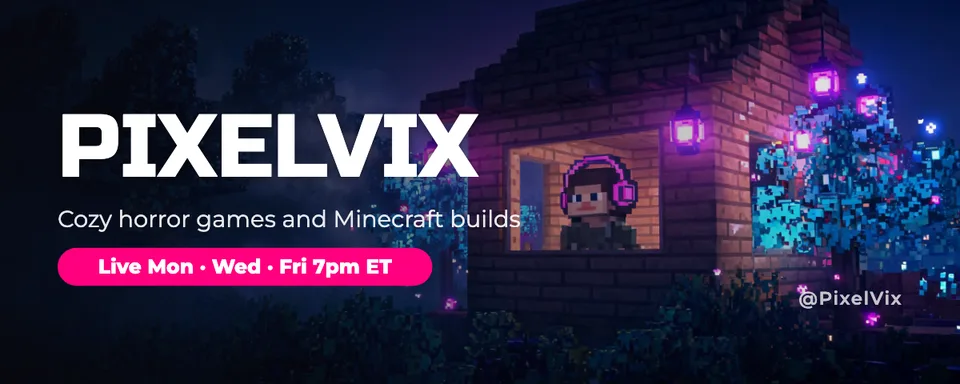
One brief.
3 results.
- Streamer name
- PixelVix
- What do you stream, and when?
- Cozy horror games and Minecraft builds · Mon, Wed, Fri at 7pm ET
- Look
- Neon


How to make it
Four steps, about a minute of your time. These are real screens from the run above.
- 01
Name the stream
Enter your streamer name, say what you stream and when (like “Cozy horror games · Mon, Wed, Fri at 7pm ET”), pick a look from Neon to Pixel art and choose how many banners to make, up to four.
Open the flow
- 02
Let the flow design it
The AI writer plans a different scene or world for each banner and turns your brief into a short line on what you stream and a schedule pill like “Live Mon · Wed · Fri 7pm ET”. Seedream 5 makes each scene with original characters and places, then Idyllic sets the type. Preview the whole flow free first.

- 03
Compare the banners
Every banner appears side by side, next to the artwork without text, so you can pick the world that feels most like your stream.

- 04
Edit in Canvas and download
Open a banner in Canvas to change any word, font or effect (neon, outline and glitch suit Twitch), move any layer, then download the 1200×480 PNG and upload it as your profile banner in your Twitch channel settings.

Why it beats
a template
Original art, yours to keep
Every scene uses original characters and places, never real game characters or logos, so the banner is safe to use and recognisably yours.
Your schedule, front and centre
Give your stream times and they become a clear pill on the banner, so new viewers know when to come back.
Type that looks like gaming
Fonts like Bungee, Russo One, Orbitron and Audiowide are picked to match the look, with neon, outline, glitch and 3D effects a click away in Canvas.
Sized for Twitch
Every banner is 1200×480, Twitch's recommended size, with the name and schedule kept in the middle band so they survive the crop on narrow windows.
Your name, spelled right
Your streamer name is set as real type exactly as you enter it, odd capitals and numbers included, not lettering drawn by the image model.
One look across the channel
Use the same look in the Twitch panels and Twitch emotes flows and your banner, panels and chat all match.
What makes a good Twitch banner
- Make your name big and clear. It's the first thing a new viewer reads.
- Say what you stream in a few words: the games or the vibe.
- Add your schedule. Viewers come back when they know when you're live.
- Use art you own: original characters, not game art or logos.
- Keep the edges simple. Twitch scales the banner to the browser window, so edges can be trimmed.
- Match your panels, emotes and overlays so the channel feels like one brand.
Twitch banner size and specs
| Profile banner | 1200×480 px | 5:2, Twitch's recommended size |
|---|---|---|
| File | JPG, PNG or GIF | Up to 10 MB |
| Panels | 320 px wide | Shown under your stream; use the Twitch panels flow |
| Idyllic export | 1200×480 px PNG | Standard export; Large export is 2400×960 |
Twitch scales the banner to fit each browser window, so the edges can be trimmed on some screens. Idyllic keeps your name and schedule inside the middle band.
Steal a brief
Each one opens the flow with the brief filled in. Change anything before you run it.
PixelVix, cozy horror games and sandbox builds, live Mon, Wed and Fri at 7pm ET, in a cozy look
Captain Crumbs, chaotic co-op games with friends, live every night at 9pm CT, in an anime look
LunaForge, pixel art and indie game dev streams, live weekends at noon PT, in a pixel art look
IronVeil, souls-like challenge runs with no deaths allowed, live Tue-Sat at 6pm, dark fantasy look
ByteBeats, live beat-making and music production with chat, Thursdays at 8pm ET, in a neon look
SnackAttackSam, cooking streams and taste tests, live Sundays at 3pm ET, in a cozy look
NovaStrike, competitive shooter ranked grind, live daily at 5pm ET, in a cyberpunk look
Quiet Quest, relaxing farming games and chill chat for night owls, in a minimal look
RuneRoller, tabletop fantasy campaigns played live with viewers, Saturdays at 2pm ET
Questions
What size is a Twitch banner?
Twitch recommends 1200×480 pixels for the profile banner, as a JPG, PNG or GIF up to 10 MB. Idyllic exports banners at exactly 1200×480, with a Large export at 2400×960.
Is the AI Twitch banner maker free?
You can preview the whole flow free: the AI writer plans your real scenes and copy, shown with sample images. Making the final banners is on Plus and up (from $10.50/mo, billed yearly) and costs 27 credits for three. The free plan also includes 3 free images a day in the image studio.
What should a Twitch banner include?
Your streamer name, a few words on what you stream and your live schedule. Socials are optional. Keep it to those and let the art set the mood.
Can I use game characters in my banner?
Idyllic draws original characters and places only. A game's characters, logos and key art belong to its publisher, so an original scene is the safer choice, and it's more recognisably yours.
Can I make matching Twitch panels and emotes?
Yes. Idyllic has ready-made flows for Twitch panels and Twitch emotes. Pick the same look and name your colours in each brief so the whole channel matches.
Will my streamer name be spelled right?
Yes. It is set as real type exactly as you enter it, not drawn by the image model, and you can edit it in Canvas.
Can I update my schedule later?
Yes. The schedule is a real text layer, so open the banner in Canvas, change the days or times and download a new PNG. The art stays the same.
Can I use the banner on a monetized channel?
Yes. Paid plans include a commercial license, so the banner can carry sponsors and merch. Paid plans also include private mode.
Make something else
Everything you can make


Your turn.
Preview the whole flow free. No credit card.